Evernote Free Device Limit: 1 Device, Web Access, and Backup Options
The Evernote Free one-device rule is real, but it is not a new November 2026 announcement. Here is what the rule covers, what you can still export, and how to keep a local copy.

Is Evernote Free limited to one device?
Yes. Evernote Free users can use Evernote on one connected device at a time. The rule started on August 6, 2024, when Evernote announced that Desktop, Mobile, and Web would each count as one device.
That last part is easy to miss. Opening Evernote Web in a browser counts as using a device, even though there is no desktop installer involved. A laptop, a phone, and a browser session are all part of the same device limit.
This is an old policy, not a new November 2026 announcement. Recent price and plan changes have brought the one-device rule back into conversations, but the rule itself has been in place since August 2024.
You can read the original announcement in Evernote's August 2024 update. The current Evernote help center still lists Free as a one-device plan.
What happens when you open Evernote elsewhere?
If you open Evernote on another device while the account is already connected elsewhere, Evernote may show an upgrade message such as Upgrade to continue using Evernote on this device. The message can be confusing because the account still exists and your notes are still in the account.
Evernote's supported way to move between devices is to sign out of one device and sign in on the next. Free users should treat that as a manual switch, rather than expecting the account to stay active everywhere.
How often can you unsync a device?
Evernote's current help information says Free and Starter accounts can unsync up to 10 devices per month. After reaching that limit, you may need to revoke a device instead. If you regularly move between a work computer, a personal laptop, a phone, and Web, keep a simple list of the devices you have connected.
A practical habit: choose one primary device for everyday editing, then use a local export when you need an independent copy. This avoids turning every backup attempt into another device switch.
What can Evernote Free users export?
Free users can still export notes, but Evernote's built-in export is designed for smaller batches. The desktop app can export up to 100 selected notes at a time, or one notebook at a time. Web export is not available, so you need a desktop client for the native export workflow.
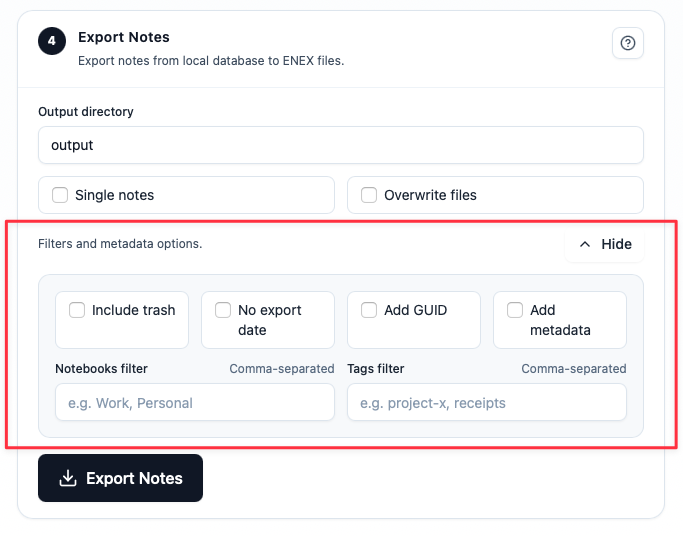
The native export options also do not provide a complete Markdown archive. Depending on your goal, you may choose ENEX for an Evernote-oriented preservation copy, HTML for a readable local archive, or Markdown through a separate export workflow.
ENEX
Keeps an Evernote-oriented structure and can serve as a future import source.
HTML
Creates a readable archive you can open in a browser and inspect without an importer.
Markdown
Useful for plain-text workflows, but attachments, tables, and task fields should be checked after export.
If you have more than 100 notes, exporting notebook by notebook can become a repetitive project. Record the notebook names, export dates, and file counts as you go. A folder full of files is not proof that every note and attachment is present.
What should you check before changing your plan?
The one-device rule is only one part of the decision. Recent Evernote changes also moved Personal and Professional users toward Starter and Advanced plans. Before you change a plan, separate the billing decision from the data check.
- Confirm which account and plan you are checking.
- Count the notebooks and notes that matter to your daily work.
- Check for attachments, tasks, internal links, and notes that are hard to recreate.
- Use the desktop app to make a local export, and keep the original files.
- Open a small sample outside the export screen to verify that the files are readable.
- Keep a second copy before you cancel, downgrade, or move to another app.
A plan change does not give you a reason to delete your source data immediately. If you are preparing to leave Evernote, see our backup and restore readiness checklist for a fuller process.
Keep a local copy before you make the account decision. The goal is to give yourself a recovery path, not to create panic around an old policy.
Evernote Free device limit FAQ
Does Evernote Web count as a device?
Yes. Evernote counts Web as one connected device along with Desktop and Mobile.
How many devices can Evernote Free use?
One device at a time. You can switch by signing out and signing in on another device.
How often can Free users unsync a device?
Evernote currently says Free and Starter users can unsync up to 10 devices per month. After that, the account may require a revoke action.
Can Free users export notes?
Yes, through the desktop app. Native export is limited to 100 selected notes or one notebook at a time, and Web does not provide the same export flow.
Will changing or downgrading my plan delete my notes?
Do not make that assumption. Check the current plan terms, keep a local copy, and verify your export before changing access or billing.
The practical takeaway
Evernote Free's one-device rule is real, Web counts as a device, and the policy dates back to August 2024. If the rule affects your workflow, use it as a prompt to create a local, readable copy of your notes. Verify the archive first, then decide whether to keep, change, or leave the plan.
Related guides
Evernote Export Missing Notes? Why Your HTML File Count Doesn't Match
An export can report success while the number of HTML files on disk looks too low. Learn how to investigate duplicate titles, filename collisions, export settings, and OneDrive workflows before assuming notes are missing.
How to Back Up Evernote Before Changing Apps or Plans
Build a local copy first, verify it, and only then change your workflow. That order removes most of the avoidable risk.
How to Back Up Evernote Properly: 3-2-1 Copies and Restore Testing
A folder full of files is not proof that your Evernote data is safe. Build several copies, keep the right export formats, and test one real restore before you need it.